
I am a Zivver admin
Configure and manage Zivver
Cloud Sync - Frequently asked questions
 Tip
TipIs your question not listed?
Don’t hesitate to reach out to us if your question is not listed on this page.
Don’t hesitate to reach out to us if your question is not listed on this page.
Why does Cloud Sync show updates of the Identifiers of accounts in Zivver?
Identifiers in Cloud Sync are used to recognize a mailbox when the primary email address changes. Cloud Sync uses the mailbox property ExternalDirectoryObjectId to identify a mailbox. Without this feature, Cloud Sync would create a new account and disable the previous email address.It is possible to reset the identifiers by adding the
reset_account_mapping parameter before starting the runbook. The parameter reset_account_mapping removes current known identifiers to add them again upon the next Cloud Sync. Zivver may request to use this parameter, for example when mailboxes are migrated to another Microsoft Exchange Online tenant.Is any action required to update Cloud Sync to new versions?
No action is required to update Cloud Sync. Updates happen automatically along with its dependencies. The Loader script downloads the necessary code and dependencies from the URL specified within the script, ensuring that the latest version is always in use.How can more logs be accessed for troubleshooting?
To view detailed logs for troubleshooting, go to the Variables section in your Automation Account and set theCLOUD_SYNC__LOG_LEVEL variable to DEBUG. The additional logs will be attached to the email report and are visible in the Automation Account.How can the permissions granted to Cloud Sync be reviewed?
Cloud Sync uses a System Managed Identity to access Exchange Online with read permissions. These permissions can be reviewed in the Azure Portal:Exchange.ManageAsApp permission:
- Navigate to Enterprise Applications.
- Deselect the filter called Enterprise Applications.
- Open the principal named ZivverCloudSync.
- Under Permissions, the API permission details are listed.
- Go to Entra ID Roles and Administrators.
- Search for the Global Reader role.
- Verify that ZivverCloudSync is assigned to this role.
Is it necessary to keep the Microsoft Graph Command Line Tools after setting up the account?
No, the Microsoft Graph Command Line Tools can be removed once the initial setup is complete. To do this, go to the Azure Portal, navigate to Enterprise Applications, and delete or edit the Microsoft Graph Command Line Tools.Is it possible to add additional administrators to the Automation Account?
Additional administrators can be added to the Automation Account. Navigate to the IAM section of the Automation Account and assign the Contributor role to the new administrators.Is it possible to change the frequency of Cloud Sync runs?
The frequency of Cloud Sync runs can be adjusted in the Schedules section of your Automation Account.What are the costs in Azure associated with Cloud Sync?
The cost of using Cloud Sync varies based on your organization's size, which affects how long each run takes. Microsoft provides the first 500 minutes of Cloud Sync per month for free. To reduce costs, consider adjusting the schedule to run Cloud Sync less frequently.In what region is the Automation Account created and can this be changed?
By default, the Automation Account is created in the West Europe region. However, you can change this by modifying the setup script before executing it.Can the Zivver support team view logs from my Cloud Sync setup?
Yes, Zivver receives telemetry from every Cloud Sync run. Any sensitive variables such as tokens or API keys are masked in the telemetry. This option can be disabled by adding a boolean variable calledCLOUD_SYNC__TELEMETRY and setting its value to False.Is it possible to select one of multiple subscriptions in Azure?
The setup script includes lines that allow specifying the ID of a subscription. The subscription ID can be copied from the Azure tenant under Subscriptions.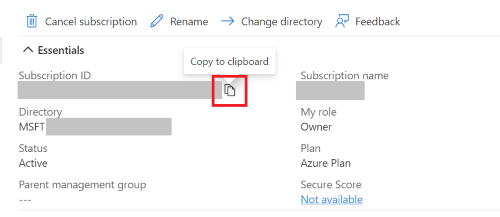
Why is the allow_large_sync parameter required for the first synchronization?
Cloud Sync does not perform syncs with large deltas without explicit confirmation to prevent unintended account suspension at large scale. The allow_large_sync parameter is required to create, update, or suspend more than 10% of the total accounts in Zivver.What groups are supported in the Source Filter?
The Group Filter makes use of the Graph API to get groups and their members. Currently, the Graph API supports the following groups:- Microsoft 365 (unified) groups
- Security groups (assigned or dynamic)
- Mail-enabled security groups
- Distribution groups