
I am a Zivver admin
Configure and manage Zivver
NTA 7516 Compliance Manual
Zivver helps your organization meet the requirements of the NTA for which a supplier such as Zivver can play a role. In June 2020, NEN granted NTA 7516 certification to Zivver as the first supplier. For more information about the assessment framework, see Secure email with NTA 7516 by NEN.
However, compliance with the NTA is a requirement for organizations and involves more than just selecting a supplier. Below, Zivver provides an overview of the aspects for which organizations themselves remain responsible before they can be considered to “comply with NTA 7516.” Some of these steps require configuration in Zivver, which is indicated for each step. Other steps require organizational, policy-related, or technical adjustments outside of Zivver. Zivver recommends first watching the (Dutch) webinar recording, which explains the steps below.
Please note that these requirements apply in combination with the use of Zivver. When using solutions that do not meet all supplier requirements, the organization must arrange (many) more measures itself.
Would you like more information about the content of NTA 7516? Visit the Zivver website. Do you need support in meeting the requirements of NTA 7516? Contact Zivver via customersuccess@zivver.com. Zivver will then tell you more about the available options.
Required actions
- Secure access to the email environment with 2FA
- Send notification messages on behalf of the organization’s domain (requires Zivver configuration)
- Configure DMARC for the incoming mail server
- Ensure that stored emails cannot fall into unauthorized hands
- Ensure that authentication details of recipients are known and verified
- Implement ‘security by default’ by automatically enabling secure email for sensitive information (requires Zivver configuration)
- Define policies and rules
- Apply logging to messages sent and received via the regular mail server
- Set up a system that allows individuals to securely send ad hoc messages to your organization on their own initiative and communicate this broadly (requires Zivver configuration)
- Secure the email domain and the (incoming) email server (with DANE or a Trusted Certificate)
- Set up a simple way to archive secure messages (optional criterion) (requires Zivver configuration)
- Perform a self assessment
- Make interoperability in accordance with NTA 7516 publicly known (requires Zivver configuration)
Secure access to the email environment with 2FA
Required for NTA 7516 requirement: 6.1.5, 6.1.7 and 6.1.10
Securing access to the email environment with 2FA is required for two reasons:
- It must be possible to demonstrate that the sender is indeed the person they claim to be.
- NTA 7516 requires that the content of ad hoc message traffic can only be read and/or processed by the intended recipient.
In practice, this means that access to a mailbox from any client (for example Outlook on the workstation, a mobile app, or webmail from home) must only be possible after logging in with verified 2FA (this is equivalent to eIDAS substantial level). Access to sensitive information using only a password must therefore not be possible.
Zivver recommends implementing 2FA on the workstation by requiring employees to log in using a password and, for example, a token. This reduces the risk of unauthorized access to computers and data within your organization. If you use SSO services, 2FA on the workstation is easy to scale. You can also extend 2FA to other applications within the organization that require 2FA, including Zivver. Alternatively, you can apply 2FA only to the mailbox to meet this requirement. Most email solutions are suitable for this by default (or can be made suitable).
Within organizations, access to the internal network or access to the physical workplace may be considered a second factor. Please note that this does not constitute security in accordance with eIDAS substantial, but may be tolerated in practice.
Send notification messages on behalf of the organization domain
Required for NTA 7516 requirement: 6.1.7
It must be guaranteed that the sender cannot deny the origin of an ad hoc message containing personal health data.
Therefore, ensure that DKIM and SPF are configured in Zivver, so that Zivver can send notification messages on behalf of the organization domain (and not from noreply@zivver.com). Follow the steps below to check whether this has been configured:
Step 1: In Zivver, go to  Organization Settings > General > Domains.
Step 2: Check the Send from own domain settings for each domain of your organization.
- Do you see:
- DKIM on and
- SPF on
- If not, continue to step 3 to add the correct TXT records to the DNS settings of your domain name.
Step 3: Log in to the portal of your hosting provider (registrar).
Step 4: Create the following additional DNS records:
- For DKIM
- For SPF
Use the variables you can find under Organization Settings > General > Domains by clicking the arrow on the right-hand side. Is your domain not listed? Then add it using the button.
If you are unable to complete these steps, create a support ticket.
 Tip
Tip Note
NoteYou must also use email addresses that allow the sender to be clearly identified. For example:
- In
From: “pete@hospital.com”, the sender is visually identifiable. - In
From: "2kjrhaja@hjaahr.tr”, the sender is not visually identifiable.
Configure DMARC for the incoming mail server
Required for NTA 7516 requirement: 6.1.7
Your own email server is responsible for incoming email (“primary MX”). Organizations must configure DMARC on this server themselves to ensure the security of incoming email.
Check whether DMARC is configured correctly as follows:
Step 1: Go to https://en.internet.nl/.
Step 2: Enter your domain(s) under Test your email.
Step 3: Check the results under Authenticity marks against phishing.
- Do you see check marks for DMARC existence and DMARC policy? Good news! Your organization has already configured DMARC on the incoming mail server.
- If not, contact your mail server provider to discuss the available options.
Ensure stored emails cannot fall into unauthorized hands
Required for NTA 7516 requirement: 6.1.9, 6.1.13 and 7.2
Ensure that stored messages are not accessible to unauthorized parties (6.1.9, 7.2)
Securing the email server where messages are stored is one of the measures required to enable interoperability between email services. Access to stored ad hoc messages by parties without valid grounds must be impossible. Stored message data must be unreadable if it ends up in unauthorized hands. Organizations must ensure that:
- Messages are encrypted when stored on both the suppliers’ email servers and the client software servers within the European Economic Area (EEA).
- Unauthorized parties have no access to the data or the keys that grant access to the information.
- All suppliers involved in sending and receiving email containing personal health information have a (processor) agreement in place.
For all messages sent and received via Zivver, this is already ensured, but many organizations use their own email server for storage, archiving, or journaling. Your organization must ensure proper encryption of messages in the following cases:
- If the organization uses its own mail server for incoming NTA emails, the server must have appropriate encryption.
- If an unencrypted copy of Zivver messages is stored, the local system and/or the storage location of the user profile must have appropriate encryption.
Check with your technical and/or functional email environment administrator whether the regular email server complies with this.
Ensure that stored messages do not leave the European Economic Area (EEA) (6.1.13)
Ad hoc message traffic must not end up in non-compatible jurisdictions. This means that messages under the responsibility of the organization must be stored within the European Economic Area (EEA).
Ad hoc message traffic may only cross the EEA boundaries in accordance with GDPR.
- For sending ad hoc messages, your organization complies with this requirement by using Zivver.
- The organization’s own (incoming) mail server must be located within the EEA to also comply with this requirement for receiving ad hoc messages.
- If you use an on-premise mail server, this is likely already ensured.
- If you use a cloud email service, make sure you use a service that guarantees data is stored only within the European Economic Area (EEA).
- Check with your provider if in doubt.
- The organization must ensure that, if ad hoc message traffic crosses the EEA boundaries, this is done in compliance with GDPR. Consult your Data Protection Officer if in doubt.
Ensure authentication details of recipients are known and verified
Required for NTA 7516 requirement: 6.1.10
NTA 7516 requires that the content of ad hoc message traffic can only be read and/or processed by the intended recipient, by using an authentication method with the appropriate level of assurance. Emails containing personal health information for recipients who do not meet NTA requirements may only be accessible after the recipient has authenticated with 2FA at the ‘substantial’ level, for example via SMS to a verified phone number. This ensures that the recipient is indeed the intended person. Organizations must also establish policies to ensure that recipient authentication details are available and verified wherever possible.
Zivver offers various methods to verify recipients via 2FA. For now, only the (verified) SMS code meets the NTA requirements. Zivver recommends emphasizing the importance of 2FA in all internal and external communications. Additionally, provide employees with proper guidance to always make the correct choice in recipient verification, thereby ensuring the appropriate level of assurance.
To facilitate this, Zivver recommends using shared recipient verification. This allows standard verification methods for recipients to be managed at the organizational level. Users within your organization automatically use the verification methods in this list. Read here how to set this up.
Authentication at a ‘substantial’ level of assurance requires at least 2FA with a controlled issuance process of the authentication method. Make effective use of purpose limitation. Current processes may need to be adjusted. For example, record mobile numbers during intake or registration processes so that the accuracy of the phone number can be personally verified.
NoteDue to the lack of widely available authentication methods at the ‘substantial’ and ‘high’ levels, the following agreements have been made:
“NTA 7516 frequently refers to authentication methods with ‘substantial’ and ‘high’ levels of assurance. These are not yet widely available for individuals or professionals. Until such methods become available, an authentication method with the highest widely available level of assurance should be used.”
Source: NTA 7516:2019 Page 8 – Introduction
In practice, this means that a verified SMS code should be used as an authentication method wherever possible.
Implement ‘security by default’ by automatically enabling secure email for sensitive information
Required for NTA 7516 requirement: 6.1.16
NTA 7516 requires that secure sending is the default when transmitting personal health information, also known as ‘security by default’. Secure sending must therefore be enabled by default: using the normal send button should result in messages being sent securely according to the NTA.
NoteWhen the organization uses Zivver for ad hoc communication of personal health information, this requirement is met if the organization sets Zivver to be enabled by default for every email or when certain business rules recommend it.
Configure this as follows:
Step 1: Activate the business rules:
- Go to Organization Settings >
 Policies > Business rules
 - Ensure that at least the following business rules are activated with the corresponding alert levels:
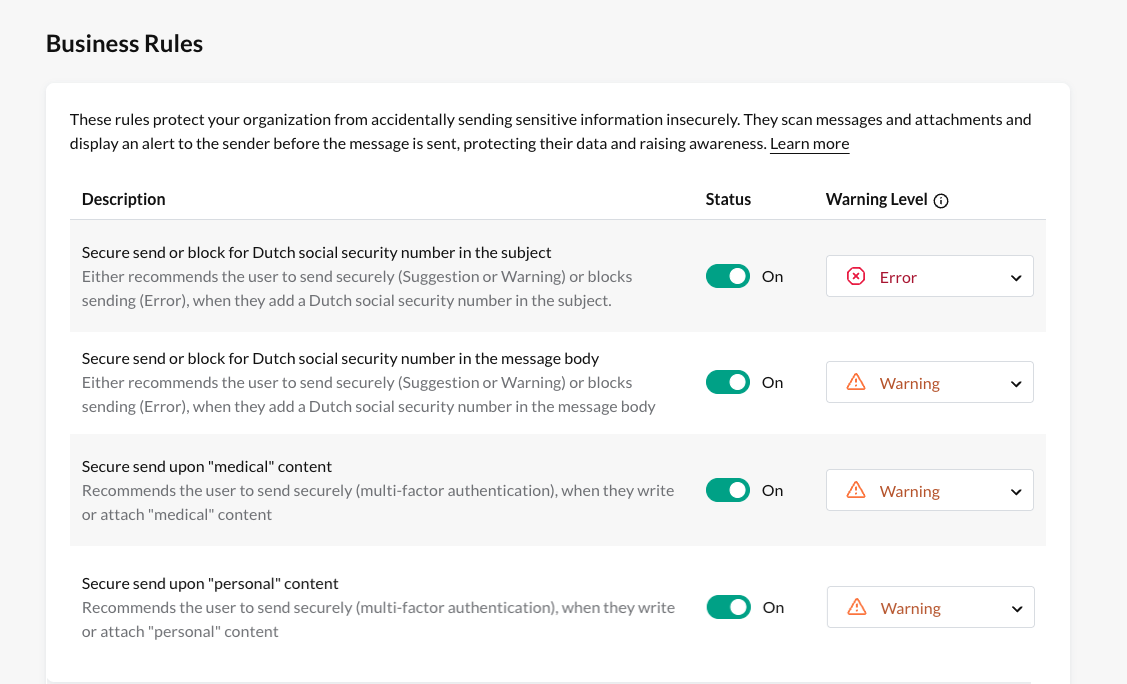
Step 2: Set the plugin to automatically enable when the business rules are triggered. This can be configured centrally for the organization or individually per employee:
Method 1: Central level
- Go to Organization Settings > Policies > Plugin settings.
- Enable the Automatically use Zivver when a business rule recommends it option

TipMethod 2: Individual level
- Inform employees affected by NTA 7516 to enable the following setting:
- Go to Outlook > Zivver tab > tune Settings
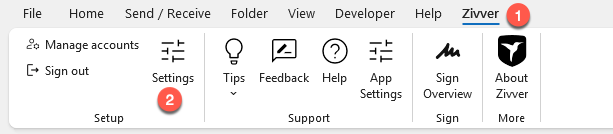
- Enable the Activate ‘Secure Mailing’ if a business rule recommends it option

- Go to Outlook > Zivver tab > tune Settings
Define policies and rules
Required for NTA 7516 requirement: 6.1.1, 6.1.8, 6.1.12, 6.3 and 6.4.1
NTA 7516 requires that policies and rules are defined and communicated to employees for various topics:
- Define minimum requirements (NTA 7516 requirement: 6.1.1)
- Policy on sender authorization (NTA 7516 requirement: 6.1.8)
- Policy on grounds for sending (NTA 7516 requirement: 6.1.12)
- Policy on usage (NTA 7516 requirement: 6.3)
- Program for monitoring and compliance (NTA 7516 requirement: 6.4.1)
Define minimum requirements (6.1.1)
Organizations must document the minimum requirements and their implementation for all normative NTA 7516 criteria.
Your organization should create an overview of the minimum requirements (thresholds) and their justification for the specified NTA 7516 criteria, for sections 6.1.2 - 6.1.19.
See Sample Program of Requirements (Dutch) for a sample program of requirements that can serve as a starting point. Zivver has prepared this for you.
Policy on sender authorization (6.1.8)
The organization must establish which types of healthcare providers are authorized to access and communicate with or about patients/clients. This policy should be translated into technical access to functional (team) or delegated mailboxes.
Policy on grounds for sending (6.1.12)
The organization must define a policy clarifying the rules for sending professionals. The policy should provide guidance on confidentiality considerations and specify which professionals may apply which grounds for sending and who oversees compliance.
Policy on usage (6.3)
Secure emailing impacts business operations. It is important to agree on practical rules for handling secure email. NTA 7516 requires policy for several aspects:
- Substitution during absence Define rules when a staff member is absent, specifying rights and restrictions for the substitute.
- Mandating and delegation of access to data Describe rules for mandating and delegation. Mandating refers to acting on behalf of another (sending, moving, copying, withdrawing messages). Delegation refers to transferring authority.
- Access without a direct treatment relationship Rules apply to healthcare providers maintaining a patient dossier under the WGBO. Specify conditions for granting access.
- Access to functional mailboxes Functional mailboxes are not linked to a single employee. Define conditions for use and access management.
- Use of an address book Briefly describe rules for individual or shared address books.
- Withdrawing or modifying email messages Specify conditions for withdrawing or modifying emails. Zivver provides this option, individually or organization-wide.
- Use of automated functions Many email services have automated features such as filters, auto-forwarding, read receipts, and automatic replies.
- Retention and destruction of email messages Retention and destruction are often regulated by law. Consult a legal expert or industry body. Often included in privacy policy.
- Handling of cryptographic keys Define access to security keys and forensic possibilities. Zivver has no access to messages or keys; users manage them. Administrators can grant access for forensic purposes via password reset and removal of 2FA, and export messages.
- Responsibilities Specify roles and responsibilities for ad hoc email communication (employees, DPO, CISO, technical and functional administrators).
- Grounds for sending See Policy on grounds for sending (6.1.12) above.
- Continuity in case of provider failure Describe how services continue if the email provider fails, according to agreements in the processing agreement with Zivver.
- Informing individuals about secure email Inform the organization’s target group about secure communication. Use Zivver’s communication templates (in Dutch) for clear communication.
Program for monitoring and compliance (6.4.1)
A program must be established to:
- Continuously monitor compliance with usage rules (see 6.3);
- Annually assess the suitability of selected and implemented communication options against established criteria;
- Every two years, evaluate the criteria for suitability and adequacy.
Apply logging to messages sent and received via the regular mail server
Required for NTA 7516 requirement: 6.4.2
In addition to the logging that takes place within Zivver, the organization must apply logging to ad hoc message traffic containing personal health information that is sent or received via the regular inbound mail server (outside Zivver conversations). This logging must also comply with the requirements of NEN 7513:2018 (with the exception of chapters 6.2 and 7).
Zivver recommends checking with your mail server provider whether these requirements are met.
Set up a system that allows individuals to send secure ad hoc messages to your organization on their own initiative and make this widely known
Required for NTA 7516 requirement: 6.5
In accordance with the NTA, organizations must offer individuals a way to send secure ad hoc messages to the organization on their own initiative. This method must also be communicated broadly, for example via the organization’s website.
With Zivver, this can easily be facilitated using Zivver’s conversation starters. If your organization already uses these and makes this known on its website, the organization already meets this criterion. If you want to meet this requirement by using Zivver’s conversation starters and/or would like to know how to integrate them into a website, please contact sales@zivver.com.
If you intend to meet this requirement in a different way, ensure that the offered method can be used by anyone with standard consumer internet access and that it is easy to use without requiring an account.
Secure the email domain and (incoming) email server (with DANE or Trusted Certificate)
Required for NTA 7516 requirement: 7.2
An important advantage of NTA 7516 is that messages can be exchanged between different available solutions, regardless of the provider. This concept is also known as interoperability or multi-channel communication. In practice, providers must ensure their product can communicate with other solutions so that recipients no longer experience issues if the sender uses a different secure solution. Thanks to this interoperability, each party can receive secure messages in their preferred NTA 7516-compliant application, similar to how anyone can now call each other seamlessly without needing the same phone provider.
To send messages interoperably according to NTA 7516, you need to secure the email domain and the (incoming) email server (with DANE or Trusted Certificate). This includes the following requirements:
- The email domain must be secured with DNSSEC;
- The incoming email server must support DANE or PKIX;
- The incoming email server must support TLS 1.2 or higher.
A scan conducted by Zivver on customer email domains shows that 80% of organizations currently meet these requirements. Most of the remaining organizations can comply with a few small adjustments. Follow the steps below to check whether your organization’s email domain and email server comply, and if not, which actions are needed to achieve compliance.
 Info Note
Step 1 Go in Zivver to Organization Settings > General > Domains.
Step 2 Check the DNS settings of your organization per domain. Do you see DANE / DNSSEC on under NTA7516 direct delivery? Then your organization already meets the NTA 7516 requirements for securing the email domain and (incoming) email server. Congratulations! You can now proceed to step 4. If not, continue to step 3.
Step 3 Use the  button to view more information about the DANE / DNSSEC settings. Take the steps below per domain depending on your situation:
Situation 1:
DNSSEC domain not found
DNSSEC mailserver on
TLSA on
PKIX on
It appears that DNSSEC has not been activated on your domain name. Contact your hosting provider (registrar) to enable it. Then proceed to step 4.
Tip InfoSituation 2:
DNSSEC domain on
DNSSEC mailserver on
TLSA not found
PKIX off
It appears that the mail server behind your domain does not support DANE and has no PKIX certificate. Contact your IT department or provider to fix this. Then proceed to step 4.
NoteSituation 3:
DNSSEC domain on
DNSSEC mailserver not found
TLSA on
It appears that DNSSEC has not been activated for the mail server behind your domain. Contact your IT department or provider to fix this. Then proceed to step 4.
Situation 4:
DNSSEC domain not found
DNSSEC mailserver not found
TLSA not found
PKIX off
It appears that multiple required elements are missing. Consult the situations above and follow the corresponding steps.
If your situation is not listed and you are stuck, contact Zivver via customersuccess@zivver.com.
Step 4 For NTA 7516, the incoming email server must also support TLS 1.2 or higher.
- Go to https://ssl-tools.net/mailservers/ and search for your domain.
- Scroll to Servers - Incoming Mails. TLSv1.2 or higher must be listed for each mail server in the second-to-last column. See the orange highlighted area in the example below.

If this is not the case, contact your IT department or provider to fix it.
If you have questions or cannot secure your email server correctly, contact customersuccess@zivver.com.
NoteSet up a simple way to archive secure messages (optional criterion)
According to NTA 7516, employees must be able to securely record a message in the EHR/ECD/dossier with a simple action, when applicable.
In this paragraph, a secure message refers to a message sent or received in compliance with NTA 7516 guidelines. This therefore includes sent and received Zivver messages, but may also include messages containing personal health information received via interoperability from another NTA-compliant communication service provider.
Zivver provides several ways to easily add a secure message to a dossier or system:
- An unencrypted copy of the secure message can be sent to the user’s mailbox, which can then typically be archived in the system.
- Additionally, the Zivver plugin can be configured to store messages locally unencrypted, if the organization wishes. The current archiving method can then be applied.
- Employees can download received messages as a PDF document or as a .eml file. The latter file extension is an acronym for email and can be loaded into any email application. The current archiving method can then be applied.
If this is relevant for your organization, set up one of the above options for your employees.
Perform a self-assessment
Required for NTA 7516 requirement: 6.6
If you want to publicly indicate that you comply with NTA 7516 (which is required to exchange messages interoperably, see the next action point), it must be assessed and confirmed that the organization meets all requirements. Organizations can currently do this through a self-assessment.
If an organization indicates that it complies with NTA 7516, but a check by the Dutch Data Protection Authority (Autoriteit Persoonsgegevens) shows that this is not the case, it will be considered fraud.
With Zivver, you are guaranteed that your organization meets the criteria of NTA 7516 set for communication service providers, as described in this overview.
An organization meets this requirement as long as it also complies with the criteria that do not apply to communication service providers, as described in this guide.
Make NTA 7516 interoperability known
Required for NTA 7516 requirement: 7.2, 7.3
When the organization complies with all NTA 7516 requirements and wants to communicate interoperably, this must be made known to other NTA 7516-compliant partners via its own DNS settings. Follow the steps below to ensure that both outgoing and incoming mail traffic of your organization can operate interoperably according to NTA 7516.
 Warning
Outgoing mail traffic To have Zivver handle outgoing mail on behalf of the organization to other NTA 7516 partners, this must be indicated in the organization’s Zivver settings.
- Step 1: Go to https://app.zivver.com/admin/nta-compliance
- Step 2: Check the checkbox
- Step 3: Click
WarningIncoming mail traffic To indicate your interoperability under NTA 7516 to other NTA 7516 partners and handle your incoming mail traffic accordingly, a TXT record must be added to the DNS settings of the domain.
- Log in to your hosting provider’s portal (registrar)
- Create an additional DNS record using the following settings:
- Name: @
- TTL: 5 min
- Type: TXT
- Value: v=NTA7516-1;startdate=year-month;enddate=year-month;provider=Zivver
Change “startdate” to the year and month when compliance started. Change “enddate” to the year and month when the certification expires or when the next internal NTA audit is scheduled, for example:
v=NTA7516-1;startdate=2025-01;enddate=2027-01;provider=Zivver

If you have difficulties, create a support ticket.
TipRemove DNS settings for NTA-7516
Remove the following TXT record from your DNS if you want to indicate that secure mail cannot be delivered NTA-7516-compliantly to your mail server:
v=NTA7516-1;startdate=2025-01;enddate=2027-01;provider=Zivver